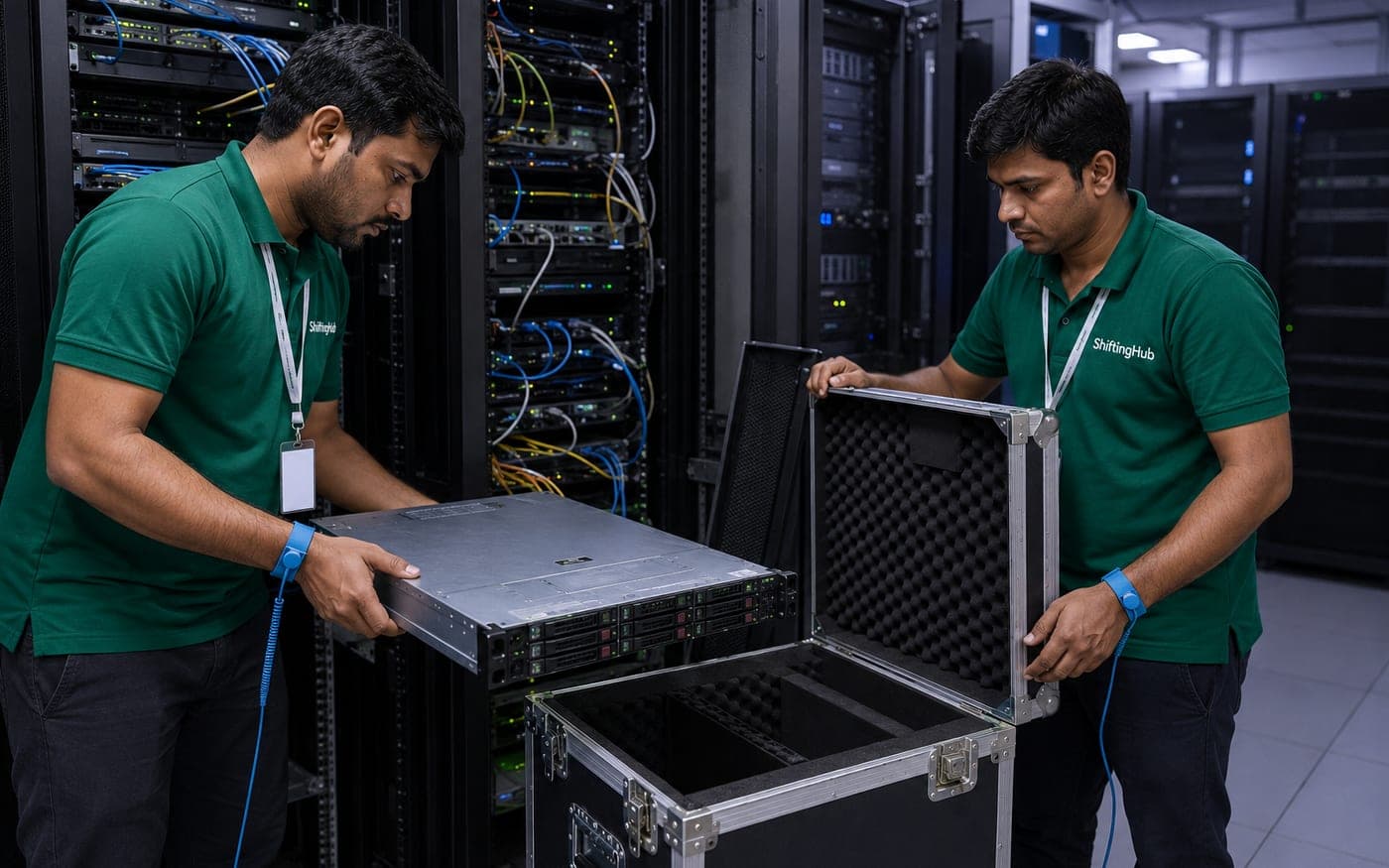
IT & Tech Relocation
Servers and workstations need more than bubble wrap. Our tech relocation partners use anti-static crates, climate-controlled vehicles, and documented cable labeling to reinstall everything functional at the new site.
Get a Free QuoteWhat's included
- Anti-static packing for servers & drives
- Climate-controlled vehicle transport
- Cable labelling & documentation
- Parallel setup at new location
- Data security compliance
- After-move connectivity testing
How it works
- 01
Infrastructure Audit
We document every rack, server, and cable before a single wire is touched.
- 02
Anti-Static Packing
Each unit is packed with ESD-safe foam in custom crates.
- 03
Climate-Controlled Transit
Sensitive hardware travels in temperature and humidity-controlled vehicles.
- 04
Reinstall & Test
Full re-rack, cable routing, and power-on testing at the new site.
Verified partners for it & tech relocation
A sample of our verified network. Compare all of them on the partners page.








IT and server relocation without the guesswork
A server rack doesn't forgive the same handling a filing cabinet does. Static discharge, humidity, and a jolted drive can each take down equipment that took years to configure correctly, which is why IT and tech relocation is treated as its own service rather than folded into a general office move. ShiftingHub matches you with partners experienced in data centre and server room moves, who document every cable and rack layout before a single wire is disconnected. Safety here means anti-static foam, ESD-safe crating, and climate-controlled vehicles that keep temperature and humidity stable across the drive, not just a blanket thrown over a tower. Transparency matters too, since a proper IT relocation quote is scoped to your actual rack count and equipment list after a site audit, not estimated over the phone.
Why choose ShiftingHub for IT relocation
Getting a server room move wrong costs a lot more than the move itself, which is exactly why this work needs a partner who's done it before.
- Partners experienced with data centre and server moves, verified and audited before listing.
- Multiple quotations scoped to your actual rack and equipment count.
- Transparent, project-based pricing rather than a flat rate that ignores your setup.
- Comparing quotes from verified movers can lower the project cost a lot.
- A nationwide network for businesses relocating or consolidating across multiple branches.
- Dedicated support and insurance assistance for high-value hardware throughout the project.
How the IT relocation process works
- 1.Submit your infrastructure details: rack count, server types, and target move window.
- 2.Compare quotations from partners experienced with your scale of setup.
- 3.Select a partner and agree on a defined shutdown window with your IT team.
- 4.An infrastructure audit documents every rack, server, and cable before disconnection.
- 5.Equipment is packed in anti-static foam and ESD-safe crates for transit.
- 6.Climate-controlled vehicles carry sensitive hardware to the new site.
- 7.Reinstallation, cable routing, and power-on testing happen before your team returns to work.
What affects IT relocation costs
- Number of racks, servers, and workstations involved.
- Whether climate-controlled transport is needed for core infrastructure.
- Scheduling around a specific shutdown or off-hours window.
- Distance between the current and new site, including multi-branch projects.
- Insurance coverage level relative to the declared value of the equipment.
- Whether reinstallation and post-move testing are included in the scope.
Scope your server room move before you brief IT.
Estimate IT relocation costTips for a smoother IT relocation
- Back up critical data before the move, regardless of how carefully hardware is handled.
- Label every cable in advance so reinstallation follows the exact original configuration.
- Agree on a defined shutdown window with your IT team well before moving day.
- Have your own IT staff present during reinstallation and testing.
- Ask specifically which parts of your setup genuinely need climate-controlled transport.
- Confirm insurance reflects the real value of your servers and networking gear.
Common IT relocation challenges and how they're solved
Downtime pressure sits at the centre of every IT relocation, since a business depending on its systems can't simply wait around for a slow reinstall. Static discharge and humidity are real risks in transit if equipment isn't packed correctly, and cable or configuration errors during reinstallation are one of the most common causes of extended downtime after a move. Demand for experienced IT movers can also clash with your preferred shutdown window during busy periods. ShiftingHub addresses this with an audit-first process that documents every connection before disconnection, ESD-safe packing as standard, and post-move power-on testing before the team considers the job done.
IT relocation across India's business hubs
Partners experienced with server and data centre moves operate across Ahmedabad, Vadodara, and Surat, as well as the corporate and tech corridors of Mumbai, Pune, Delhi NCR, Bengaluru, Hyderabad, Chennai, and Kolkata. Businesses consolidating multiple branch offices into one location, or relocating a single data centre across cities, find the same verified standard of anti-static handling and documentation regardless of destination.
What a proper infrastructure audit actually covers
An infrastructure audit isn't just a walk-through with a clipboard. It typically documents every rack's physical position, the exact port each cable connects to on both ends, power draw for each unit, and any environmental requirements specific to particular hardware, like a server that runs hotter than the rest of the rack. This level of detail matters because reinstallation is only as accurate as the documentation behind it. A rushed or incomplete audit is one of the most common reasons a move that looked simple on paper turns into a longer-than-expected downtime window, since the team ends up guessing at configurations rather than following a clear record. For a smaller setup, this audit might take an hour or two. For a full server room, it's reasonable to expect the audit itself to take the better part of a day, done separately from the actual move.
Ask to see the audit documentation before moving day if it matters to your team, and involve your own IT staff in reviewing it. Catching a mislabelled port or an incomplete rack diagram before the shutdown window begins is far easier to fix than discovering it once the new site's systems are already being tested.
The businesses that get through an IT relocation cleanly are usually the ones that treat the audit and cable documentation as seriously as the physical move itself.
Moving the rest of the office alongside your servers?
See office relocationFrequently asked
Can you move a live server without data loss?
We coordinate planned shutdown windows and use documented power sequences to ensure clean migrations.
Do you handle UPS and cooling equipment?
Yes. UPS, rack-mount cooling units, and patch panels are all within scope.
How much does IT and server relocation cost?
IT relocation is typically quoted after a site survey rather than a flat rate, since pricing depends on the number of racks, servers, and workstations involved, along with the level of climate control and anti-static handling required. A single server rack move within the same city costs considerably less than relocating a full data centre across cities. Your partner will assess your specific setup and give a written quote covering packing, transport, and reinstallation before anything is scheduled.
Can you move a data centre without extended downtime?
Yes, this is planned around a defined shutdown window agreed with your IT team in advance, so downtime is predictable and minimised rather than open-ended. The move typically happens overnight or over a weekend, with documented power-down sequences followed in a specific order and reversed carefully at the new site. For businesses that cannot tolerate any downtime at all, a phased migration with redundant systems running in parallel is sometimes recommended instead of a single cutover move.
How is sensitive equipment protected from static and moisture?
Servers, drives, and other sensitive components are packed using anti-static foam and ESD-safe bags before going into custom crates, which prevents electrostatic discharge from damaging internal circuitry during handling. Climate-controlled vehicles maintain stable temperature and humidity throughout transit, which matters since sudden swings in either can affect hardware, particularly hard drives. This combination of anti-static packing and controlled transport conditions is the main reason IT relocation is treated differently from a standard office move.
Do you provide cable labelling and documentation?
Yes, every cable is labelled and documented before disconnection, recording which port and device it connects to on both ends. This documentation is handed over alongside the equipment so reinstallation at the new site follows the exact same configuration rather than relying on memory or guesswork. For complex server rooms with dozens of connections, this labelling process is one of the most important parts of the entire relocation, since it directly determines how quickly systems come back online.
Can workstations and monitors be moved along with servers?
Yes, workstations, monitors, and general office IT equipment are moved as part of the same project as your server infrastructure, so everything arrives and is set up together rather than in separate uncoordinated trips. Monitors and desktops get anti-static wrap and cushioned crating similar to server equipment, just without the same level of climate control typically reserved for core infrastructure. Bundling everything into one relocation project also makes scheduling and coordination considerably simpler for your IT team.
Is climate control necessary for tech equipment transport?
For core server infrastructure and sensitive hardware, yes, climate-controlled transport is strongly recommended since extreme heat or humidity during a long drive can affect components even when they are well packed. For standard workstations, monitors, and general IT peripherals, standard transport with proper anti-static packing is usually sufficient. Your partner can advise which parts of your setup genuinely need climate control versus what can travel in a standard vehicle, so you are not overpaying for protection you do not need.
Do you help with reinstallation at the new site?
Yes, reinstallation is part of the standard IT relocation service, including re-racking servers, routing cables according to the documented layout, and reconnecting equipment in the correct configuration. Power-on testing is done afterward to confirm systems are functioning before the movers leave the site. For more complex environments, your own IT team is often present during this stage to verify configurations and run their own checks alongside the relocation team.
How do you ensure data security during the move?
Physical security measures like sealed crates, a documented chain of custody, and limiting who handles sensitive equipment all reduce risk during an IT relocation. For businesses with strict compliance requirements, we can coordinate around your internal data security policies, including having your own IT staff present at both pickup and delivery. Encrypting drives before the move and taking a backup beforehand, as a general precaution, is also worth doing regardless of who is handling the physical relocation.
Can the move be scheduled outside business hours?
Yes, IT and server relocations are commonly scheduled overnight or over a weekend specifically to avoid disrupting business operations during the workday. This also gives more buffer time for reinstallation and testing before staff arrive and start relying on the systems again. Your coordinator will work with your IT team to pick a window that balances minimal disruption with enough time to properly test everything before it goes back into active use.
What insurance is available for IT equipment?
Transit insurance for IT equipment can be scaled to the declared value of your servers, networking gear, and workstations, which is worth discussing carefully given how expensive this equipment typically is compared to standard office furniture. Your partner will walk through coverage options during the site survey so you can choose a level appropriate to your setup's actual value, and the claims process is explained clearly upfront in case it is ever needed.
Do you handle networking equipment like switches and routers?
Yes, switches, routers, patch panels, and other networking hardware are included in the scope of an IT relocation alongside servers and workstations. These are packed and labelled the same careful way, since network configuration errors after a move can be just as disruptive as server issues. Documenting the network topology before disconnection, alongside standard cable labelling, helps ensure the network comes back up in the correct configuration once everything is reinstalled at the new site.
How far in advance should an IT relocation be planned?
For anything beyond a single small server rack, planning two to four weeks ahead is recommended, since a proper IT relocation involves a site survey, a defined shutdown window coordinated with your team, and often a dry run of the reinstallation plan before moving day. Complex, multi-rack data centre moves benefit from even more lead time. The more advance notice your IT team and the relocation partner have, the smoother the actual downtime window tends to be.
Can you move equipment between multiple office branches?
Yes, IT relocations spanning multiple branches or offices are coordinated as a single project with one point of contact managing the schedule across all locations. This is common for businesses consolidating several offices into one, or redistributing equipment across branches as part of a restructuring. Your coordinator sequences the pickups and deliveries logically so equipment arrives where it is needed in a workable order rather than everything showing up simultaneously and overwhelming the new site's setup.
What precautions are taken for hard drives during transit?
Hard drives are among the most shock-sensitive components in any IT setup, so they are packed in anti-static, foam-cushioned cases and, where possible, kept separate from other heavier equipment to avoid pressure or impact during transit. Vehicles are driven with extra care on this kind of load, and climate control helps prevent condensation-related issues. If your drives contain critical data, a backup beforehand is still recommended as a general precaution, regardless of how carefully the physical transport is handled.
Do you offer post-move testing and connectivity checks?
Yes, after reinstallation the movers run power-on tests and basic connectivity checks to confirm equipment is functioning before considering the job complete. For more detailed application-level or network-level testing, your own IT team typically takes over from there, since they know your specific systems and what a fully working state looks like. The relocation team's role is to hand over equipment that is physically reinstalled, powered on, and connected correctly.
Can small IT setups like a single server rack be moved too?
Yes, IT relocation is not limited to large data centres. A single server rack, a small office's networking setup, or even a handful of critical workstations can be booked using the same careful anti-static packing and climate-controlled transport as a larger project, just scaled down. Smaller setups are generally quicker to plan and move, though the same principles around cable labelling and documentation still apply to keep reinstallation smooth.
Ready to book it & tech relocation?
Get free quotes from verified movers instantly.